

Wearable devices track your movement and heart rate throughout the night to determine your sleep patterns. These physical signals allow the device to estimate sleep stages by comparing your data against known patterns of rest and activity. Your watch or ring detects small changes in blood flow and body position, translating them into estimates of light, deep, and rapid eye movement sleep. This process resembles a weather station using temperature and air pressure to infer rain without seeing clouds.
Sensors Wearable Devices Use to Estimate Sleep Stages
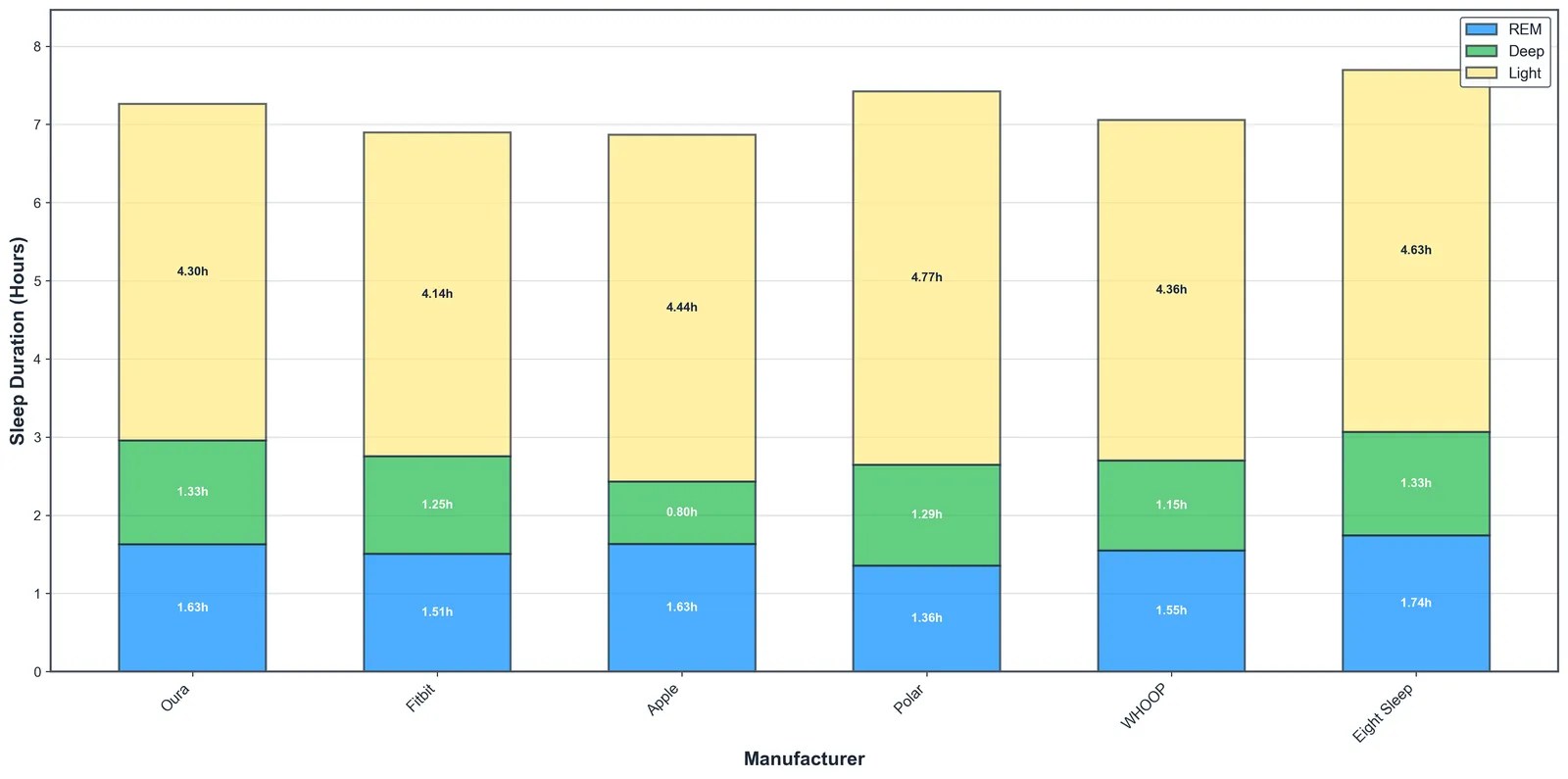
A wearable device relies on specific sensors to gather information while you sleep. Each sensor tracks a different biological sign to build a full picture of your night. When one of these sensors has a poor connection to your skin, the device might struggle to identify when you’re awake or moving.
| Part or input | What it does | What you notice when it goes wrong |
|---|---|---|
| Accelerometer | Tracks movement and body position | Sleep time looks shorter than reality |
| Optical sensor | Measures pulse and blood flow | Heart rate data appears missing |
| Battery level | Powers the continuous sensing | Data gaps appear in the morning |
| Skin contact | Ensures stable light reflection | Sensor light blinks or reports errors |
| Software app | Processes raw data into stages | Stages don’t show in history |
Most users make the mistake of wearing their device too loosely. If you can slide a finger between the strap and your wrist, the optical sensor will likely lose its seal. This causes the green light to bleed out, resulting in “ghost” heart rate readings or erratic sleep stage reporting. Tighten the strap by one notch before bed to ensure the sensor remains flush against your skin.
If you have a hairy wrist or dry skin, the sensor may struggle to maintain a consistent signal.
If your device reports you were awake for hours despite feeling rested, check the accelerometer. It triggers when it senses high-frequency movement. If your partner moves frequently in bed, the device may mistakenly attribute their motion to your profile. In this case, move the device to your non-dominant wrist to isolate your own movement patterns from external vibrations.
How the tracking cycle works
The device begins its work the moment you fall asleep, continuously recording data until you wake up. This process relies on consistent signals to ensure the stages are mapped correctly.
The accelerometer detects when your body stops moving, which marks the start of your sleep session. This usually takes 5 to 20 minutes of stillness depending on your initial restlessness. If you toss and turn for longer than 20 minutes, the device may misidentify the start time, leading to an inflated “time to fall asleep” metric.
The optical sensor begins tracking your heart rate, looking for the slow, steady rhythm that happens when you enter a resting state. It compares your current heart rate and movement against your personal baseline to decide if you have entered light or deep sleep.
As you transition through different cycles, the device watches for subtle changes in heart rate variability, which often signal a move into REM sleep. If your heart rate remains elevated due to late-night exercise or alcohol consumption, the device may struggle to distinguish between light sleep and wakefulness. In these cases, your deep sleep percentages will likely appear artificially low.
If you wake up and move around for more than 5 minutes, the device stops the sleep cycle and logs that time as an awake period. This is the threshold for a “split night.”
The device finishes the cycle once you get out of bed and move enough to trigger the wake-up threshold set in the app. If you stay in bed reading or scrolling on your phone, the device will continue to count that time as light sleep. To ensure accuracy, always stand up and walk a few steps immediately upon waking to finalize the daily report.
Why data accuracy varies during the night

The accuracy of sleep stage estimation depends heavily on the quality of the signal between your skin and the device. Wearables use a technology called photoplethysmography to track blood volume changes, which allows them to infer your current sleep stage.
If the device is too loose on your wrist, the optical sensor may struggle to get a clean reading of your pulse. This leads to gaps in your data or incorrect stage labeling. The device can’t distinguish between a low heart rate and a failing sensor signal.
This problem worsens as the night goes on. Your wrists swell slightly during the first few hours of lying flat. A band that fit perfectly at bedtime might sit a millimeter away from your skin by three in the morning. That tiny gap lets ambient light leak into the optical sensor. When this happens, the algorithm often defaults to guessing you’re in light sleep. It does this because the noisy signal resembles the subtle heart rate shifts of lighter stages.
Movement also plays a large role in how the device categorizes your night. Because the accelerometer is the primary tool for detecting the difference between being awake and being asleep, tossing and turning can trick the software. The National Institute of Neurological Disorders and Stroke notes that sleep architecture is complex. Even medical-grade sensors in a lab must account for these variations in movement to get a true reading.
You should also consider your own physiology when looking at these results. Some people have naturally lower resting heart rates, which can confuse the algorithms on certain devices. If your device shows you in deep sleep for a very long time, it might be misreading a very slow heart rate for that specific stage. Always check your device settings to ensure your age and weight are current. These factors change how the software interprets your raw data.
Skin temperature introduces another shift after midnight. As your core temperature drops to its lowest point around four in the morning, blood vessels near the surface constrict. Less blood flows past the green LEDs on the back of your wearable. The resulting drop in signal strength mimics the quiet cardiovascular profile of deep sleep. Devices without dedicated skin temperature sensors often mistake this natural cooling for extra deep sleep minutes.
If you sleep on the arm wearing the tracker, pressure against the mattress compresses the tissue beneath the sensor. This mechanical squeeze distorts the blood volume readings entirely. Switching the device to your non-dominant wrist usually avoids this issue. Most people don’t roll onto their less active side as often.
Adjusting your wearable settings
You have some control over how your device captures data, but the core processing remains fixed by the manufacturer. You must work within the limits of the hardware to get the best results.
Things you can change
Adjust the tightness of the strap so the sensor stays flush against your skin without cutting off circulation. A gap as small as two millimeters lets ambient light leak in and corrupts heart rate readings during movement.
Update your profile with your correct age and weight whenever either changes significantly. Algorithms use these inputs to calibrate resting heart rate baselines and estimate energy expenditure accurately.
Clean the back of the device weekly to keep the sensors free of sweat residue and dust. Buildup creates a physical barrier that scatters optical signals and causes intermittent data dropouts.
Set your typical sleep schedule in the app to improve detection accuracy. This tells the processor when to expect stillness versus wakefulness, reducing false positives from quiet reading or late-night phone use.
Things fixed by design
The specific algorithm used to translate raw heart rate into sleep stages can’t be modified or replaced. Each manufacturer uses proprietary models trained on their own validation datasets.
The sensitivity thresholds for accelerometer movement detection are hardcoded at the factory. You can’t increase sensitivity to capture subtle restlessness or decrease it to ignore partner movement.
Battery life limits prevent continuous high-frequency sampling throughout the night. Most devices downsample during deep sleep phases to conserve power, which may miss brief arousals.
If you believe your sleep patterns are abnormal, these devices aren’t a substitute for professional medical advice. A doctor or sleep specialist has the tools to conduct a formal study that measures brain waves, which is the only way to confirm a sleep disorder. If you feel tired after a full night of sleep, speak with a medical professional rather than relying on software estimates.
Getting better results from your device

To get the most accurate information, ensure your device is worn consistently every night. Irregular wear makes it hard for the device to establish your personal baseline. That baseline is how it learns to distinguish your unique sleep patterns.
If you only wear the watch occasionally, the software will struggle to differentiate between a night of poor sleep and a bad connection. Most algorithms need at least seven consecutive nights of data before their estimates stabilize.
Keep the device charged above 30 percent before you go to bed. Many devices reduce their sensor sampling rate to save power when the battery drops low. This directly reduces the accuracy of your sleep stage reports.
A watch that dies at three in the morning splits your night into two incomplete fragments. The app will often discard both halves because neither meets its minimum duration threshold.
If you find the device uncomfortable, try switching it to your non-dominant hand. You can also swap the stock band for a softer strap material like woven nylon.
A comfortable fit is the single most important factor in keeping the sensor in place while you move. Position the watch about one finger width above your wrist bone. Placing it directly over the joint causes the optical sensor to lose contact every time you bend your arm.
People with very dark skin or dense wrist tattoos often get noisy readings from optical sensors. The melanin or ink absorbs the green light the sensor relies on to track blood flow.
Finally, compare your device data with how you feel when you wake up. If the data shows plenty of deep sleep but you feel exhausted, trust your body over the screen.
Use the numbers to spot long-term trends rather than judging a single morning. Watch whether your sleep quality improves when you go to bed at a consistent time each night.
Conclusion
While these gadgets offer helpful insights, don’t worry if your data looks a bit off some mornings. Treat the results as a general guide rather than a perfect medical report. If you’re feeling tired despite what your watch says, it’s a good idea to talk with your doctor about your sleep quality.