

If you want a device that tracks health metrics with ease, choosing a fitbit vs garmin: which fitness wearable is better for you? Depends on whether you prioritize simple lifestyle tracking or advanced athletic data. Most casual users prefer Fitbit for its intuitive app and sleep features, while serious athletes choose Garmin for its superior GPS accuracy and deep performance metrics.
Comparing fitness wearable features
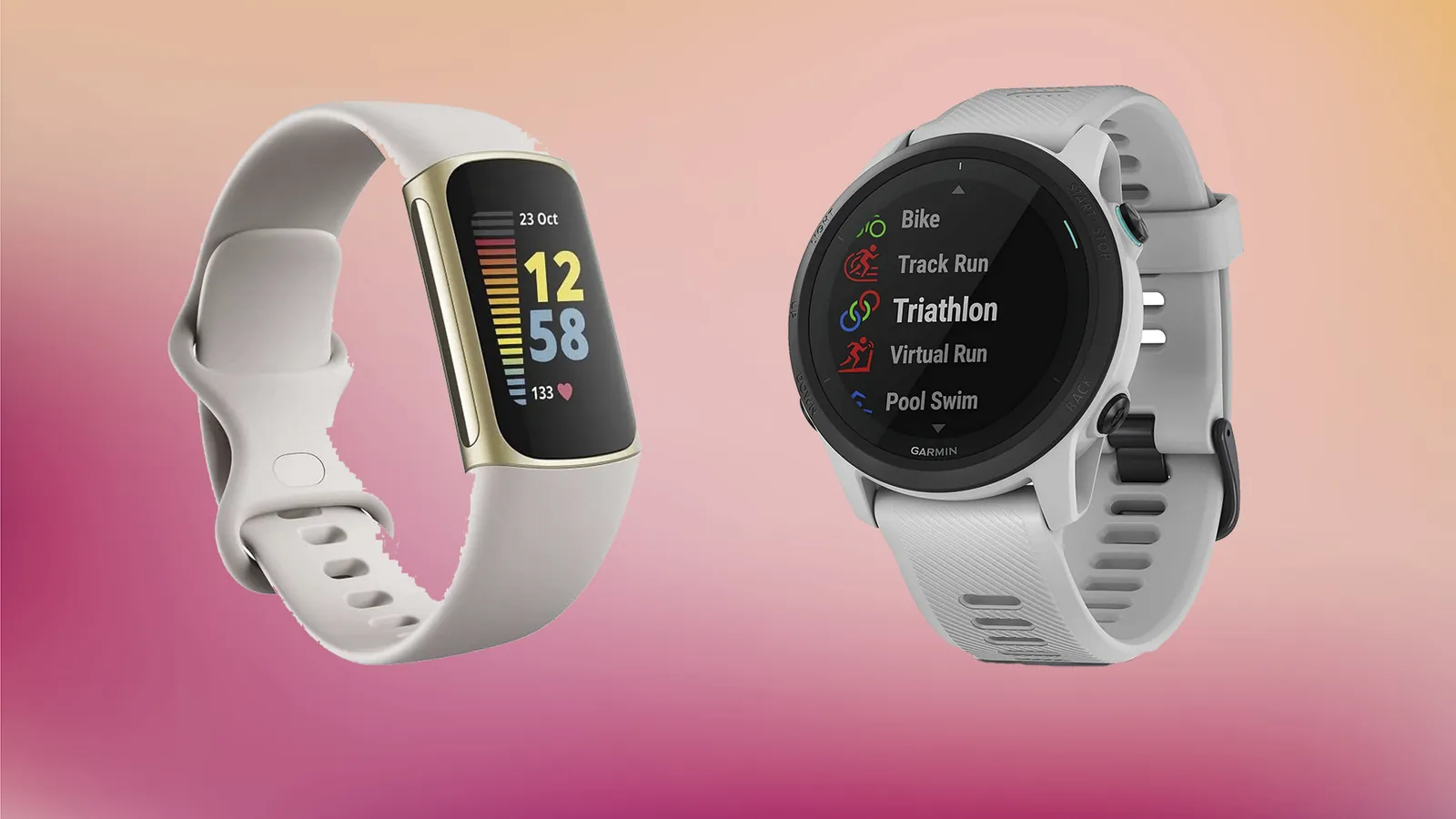
The right choice depends on your daily habits. Fitbit focuses on wellness, whereas Garmin targets performance and outdoor endurance.
| Method | How long | Effort | Cost | Best for |
|---|---|---|---|---|
| Fitbit | 5-10 days | Low | Low | Casual health tracking |
| Garmin | 7-21 days | Medium | Medium | Marathon training |
| High-end Garmin | 14-30 days | High | High | Outdoor endurance sports |
This table assumes standard battery life under typical usage. If you’re a beginner, Fitbit provides a smoother start; if you’re an athlete, Garmin offers the data depth you need.
Easy health tracking with Fitbit
Fitbit devices offer a seamless experience for those who want to monitor their daily activity without complex setups. You can track steps, heart rate, and sleep quality using the proprietary app.
Download the Fitbit app and create your account. Charge the device for at least 2 hours before the first use. Sync your device via Bluetooth to your smartphone. Set your daily goals for steps and active zone minutes.
These devices excel at making health data accessible. If you want to monitor your heart rate, check the official Fitbit heart rate accuracy guidance to ensure your band fits correctly. A common mistake is wearing the strap too loose during high-intensity workouts. If the sensor loses contact with your skin, your heart rate data will show gaps or inaccurate spikes. Tighten the band by one notch before you start a run to maintain consistent tracking.
You should distinguish between casual activity monitoring and clinical-grade diagnostics. If you need to track heart rate variability for serious athletic training, these devices provide a baseline but lack the granular recovery scores found in professional gear. Use these trackers to identify long-term trends in your resting heart rate rather than reacting to a single day’s fluctuation. A shift of five beats per minute over a week is a meaningful signal of fatigue or illness.
If your primary goal is weight management, prioritize the active zone minutes metric over raw step counts. Step counts are easily inflated by household chores, while active zone minutes require an elevated heart rate that actually correlates with caloric burn. If you’re training for endurance, focus on your cardio fitness score within the app.
If that number remains stagnant for more than three months, increase your weekly intensity by ten percent. If your score drops, prioritize rest days to avoid overtraining. These devices are most effective when you treat the data as a compass for behavior change, not as a definitive medical record.
Data-driven performance with Garmin
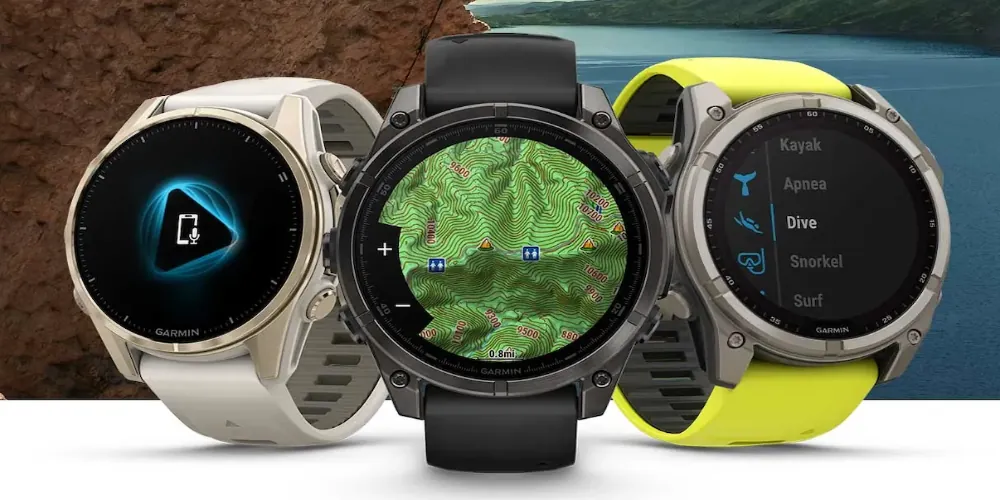
Garmin watches are built for people who need precise data during intense training sessions. They provide detailed insights into your running dynamics, training load, and recovery time.
Install the Garmin Connect app on your mobile device. Select your sport profile, such as running or cycling. Wait for the satellite signal to lock before starting your workout. Review your performance data after syncing to the cloud.
The most common mistake is ignoring the Training Readiness score during your first two weeks of use. This metric aggregates your sleep quality, recovery time, and recent strain to tell you if you should push hard or rest. If your score falls below 40, skip the high-intensity intervals. If it stays above 75, you’re clear to attempt a personal best.
These watches are excellent for athletes who track progress over months or years. They offer long battery life and durable hardware that survives harsh outdoor conditions.
You should choose a Forerunner model if your primary focus is lightweight performance and advanced running metrics like ground contact time. Opt for the Fenix or Epix series if you require sapphire glass and multi-band GPS for navigation in dense forests or canyons. The Fenix adds significant weight, so avoid it if you’re training for short-distance speed where every gram matters.
One weakness is the steeper learning curve, which can overwhelm people who only want to count daily steps. If you find yourself spending more time navigating menus than actually moving, you’re likely over-analyzing the secondary metrics. Focus exclusively on your heart rate zones for the first month.
Once you establish a baseline for your aerobic capacity, then begin incorporating cadence and power data into your weekly reviews. This gradual approach prevents data fatigue and ensures you actually use the watch to improve your fitness rather than just monitoring it.
Specialized outdoor and endurance gear
For those who spend time in the wilderness, specialized Garmin models include topographical maps and advanced navigation tools. These features help you track your route and elevation changes in real time.
Download offline maps via the Garmin Explore app. Calibrate the built-in altimeter and compass. Start your navigation activity to track your path. Save your coordinates periodically to ensure data integrity.
Reliability in the field depends on managing your power settings before you leave the trailhead. If you plan to be out for more than 48 hours, switch the watch to “Expedition Mode” to extend battery life by disabling non-essential sensors. Most users make the mistake of leaving the pulse oximeter active during sleep, which can drain up to 20% of your battery in a single night.
This equipment is designed for long-term reliability in the field, not for someone who just wants to check their morning step count. The extra features add bulk and cost that become a hindrance during casual daily use. If your primary goal is fitness tracking, a standard Vivosmart model will provide better comfort and a lower profile.
If you’re training for a multi-day hike, test your battery settings at home before you head into the mountains. Run a simulated GPS track for six hours while walking in your neighborhood. If the battery drops by more than 15%, your current settings are too aggressive for a multi-day trek.
When navigating dense tree cover, you must switch your satellite setting to “Multi-Band” to maintain an accurate signal. If you’re in an open area with a clear view of the sky, you can use “GPS Only” to save energy. This simple toggle prevents the watch from hunting for signals that are blocked by rock walls, which is the most common cause of rapid battery failure in remote terrain.
Selecting the better fitness wearable
When you’re in a hurry, choose a Fitbit because the setup process takes only minutes and the interface is intuitive. If you’re doing this for the first time, a Fitbit is also the better choice because it doesn’t require deep knowledge of sport science. You can rely on its automated sleep tracking and step counting without ever touching a settings menu.
However, when you want the best possible result whatever it takes, choose a high-end Garmin for its unmatched GPS accuracy and advanced physiological metrics. These devices provide granular data like training load, recovery time, and heart rate variability. If you’re training for a specific event like a marathon or a triathlon, this data is essential to prevent overtraining injuries.
A common mistake is buying a watch that’s too complex for your actual needs, which leads to abandoned devices in desk drawers. If you find yourself ignoring your watch because the interface feels like a chore, you have overbought. A device is only useful if the data it provides is actionable for your current routine.
Use this rule: if you exercise to improve general health, prioritize battery life and comfort over advanced metrics. If you exercise to beat a personal record, prioritize sampling rate and sensor precision. You can tell which category you fall into by looking at your last month of activity. If you rarely check your heart rate zones or pace splits, the extra features on a high-end watch will only create digital noise.
If you’re unsure, start with a mid-range model that offers heart rate monitoring and basic GPS. If you find yourself wanting to know your VO2 max or training effect after three months, you have outgrown the entry-level device. At that point, you can upgrade with the confidence that you’ll actually use the advanced sensors. Don’t pay for a professional-grade tool until your discipline matches the depth of the data you’re tracking.
Rules for consistent tracking
Regardless of the brand, consistent wear is the key to accurate data. You must wear the device snugly above the wrist bone to maintain a steady heart rate reading throughout the day. Aim for a placement roughly one finger-width away from the protruding ulna bone. If the sensor sits directly on the bone, it will shift during movement and create gaps that allow ambient light to interfere with your readings.
Check your data daily to identify trends in your sleep and activity levels. A single outlier is rarely a cause for concern, but a three-day deviation in your resting heart rate often signals the onset of illness or overtraining.
If you notice a sudden drop in heart rate accuracy, clean the sensor on the back of the watch with a soft, lint-free cloth and water. Oils and sweat create a film that traps light, leading to the erratic spikes common in cheaper sensors.
When you finish a workout, always sync your device immediately to save your progress. Many devices have limited onboard storage and will overwrite your oldest session once the memory buffer is full. If you regularly train for more than two hours at a time, sync after every session to prevent data loss.
If you have a medical condition, consult your doctor before relying on a wearable for health information. Consumer-grade sensors are for fitness, not clinical diagnostics. If your device shows a resting heart rate consistently above 100 or below 40 beats per minute, don’t assume it’s malfunctioning. Schedule a professional ECG test to verify these findings and ensure your health data is accurate.