

Bluetooth audio codecs explained means a digital audio signal is compressed into a smaller stream before it travels from a phone or computer to wireless headphones or speakers. The most common codecs are SBC, AAC, aptX, aptX Adaptive, LDAC, and LC3. A codec’s bit rate, sample rate, and latency decide how much detail survives the trip and whether video stays in sync. This guide covers which codec to pick for your gear, what the numbers actually mean, and where the limits are.
How bluetooth audio codecs work
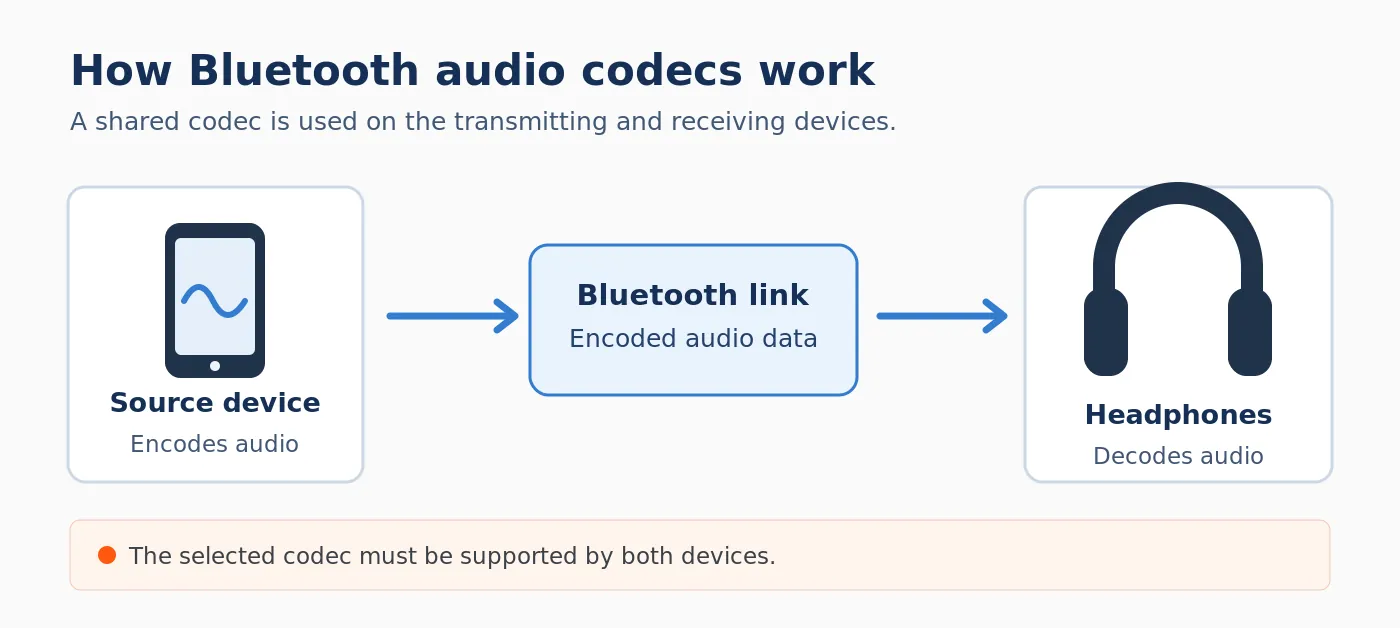
A Bluetooth audio codec is the software that squeezes digital sound into a wireless stream and then unpacks it on the other side. Without a codec, raw CD-quality audio needs about 1,411 kilobits per second, which Bluetooth can’t carry reliably. Codecs throw away data the ear is unlikely to miss so the music fits inside the wireless connection’s limits.
Think of this process like packing a suitcase for a flight. You fold and compress your clothes to ensure everything fits into the overhead bin without leaving items behind on the tarmac. The codec acts as the organizer, deciding which parts of the audio file are essential for the listener and which can be discarded to save space.
Your phone and your headphones must agree on the same codec before music plays. If both support aptX, they use it; if not, they fall back to SBC, which every Bluetooth audio device must support. The codec is built into the chips inside your devices, not something you install yourself.
One misconception is that a higher bit rate always sounds better. A codec’s efficiency matters just as much as its number. A modern codec at a modest bit rate can outperform an older one running much hotter. Also, the codec can’t improve the quality of your source file; it can only preserve or lose detail from what it receives. If your source file is low-quality, the codec simply preserves that lack of clarity.
Pick the right codec for your gear
- Check what your phone or computer supports. iPhones use SBC and AAC. Android phones often support SBC, AAC, aptX, aptX Adaptive, and LDAC depending on the model. Macs support SBC and AAC.
- Check what your headphones or earbuds support. This is printed on the box or in the specifications, not on the earbuds themselves.
- Match the highest codec both sides support. If your phone supports aptX Adaptive and your headphones do too, use that. If only one side supports it, the pair negotiates down to the next shared option.
- On Android, open Developer options and select the Bluetooth audio codec manually if you want to force a specific one. On Apple devices there’s no manual codec switch; the devices choose automatically.
- Play a track you know well and listen for clarity in voices and cymbals, which reveal compression first.
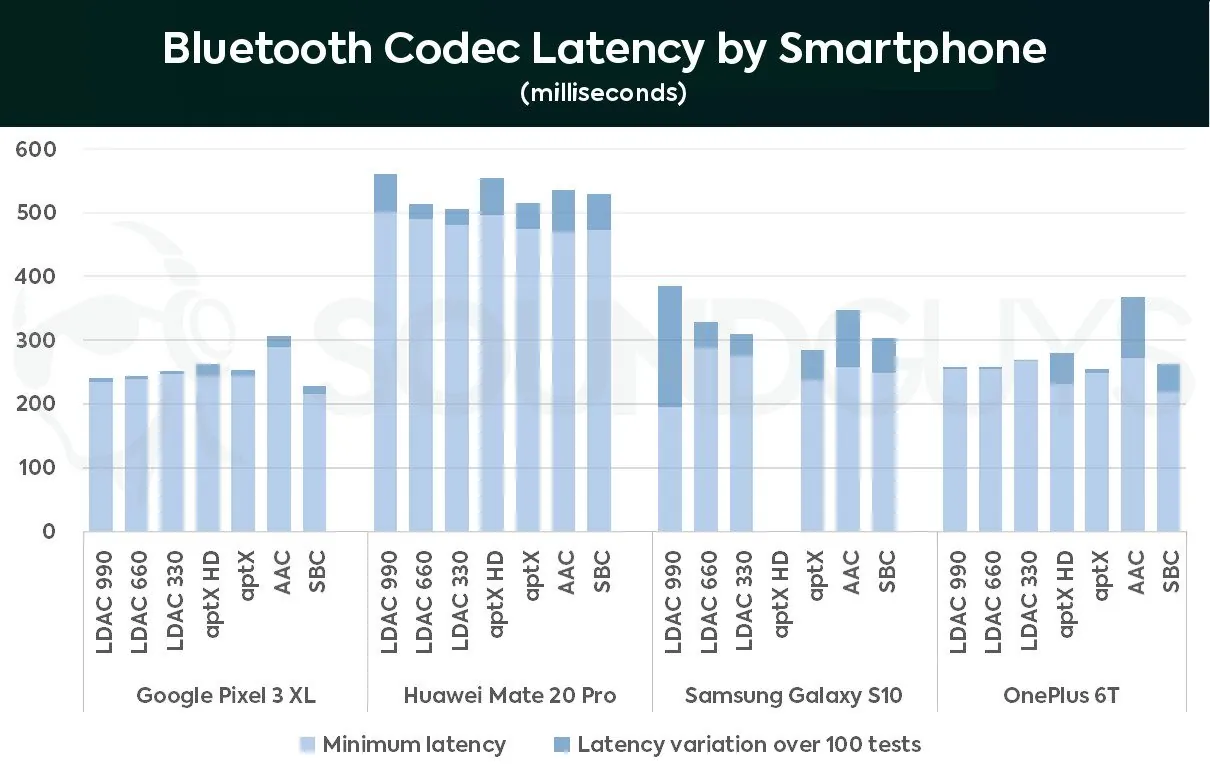
- If video looks out of sync with the sound, switch to a low-latency codec such as aptX Low Latency or aptX Adaptive if both devices offer it.
- Turn off the manual selection and let the devices choose again if the connection drops or stutters after you force a codec.
The single judgement call is bit rate versus connection stability. A high-bit-rate codec such as LDAC at 990 kilobits per second can sound richer, but it needs a strong, clean wireless link. If you walk through a crowded area or move far from your phone, that same setting can stutter or cut out. A lower, steadier setting often gives you more music and fewer dropouts.
Key numbers and settings at a glance
This table collects the figures readers come back for, with the condition each one assumes.
| Situation | Codec to use | Bit rate that matters | What to watch for |
|---|---|---|---|
| Every phone and headphone pair | SBC | Up to 328 kbps | Universal, but the lowest quality of the common codecs |
| iPhone with AirPods or Beats | AAC | Around 250 kbps | Apple-optimised, but inconsistent on Android |
| Android phone with aptX headphones | aptX | Up to 357 kbps | Needs support on both sides |
| Watching video or gaming | aptX Low Latency | Up to 350 kbps | Keeps audio and video in sync |
| High-resolution files on compatible Android | LDAC | 330, 660, or 990 kbps | Highest setting needs a strong signal |
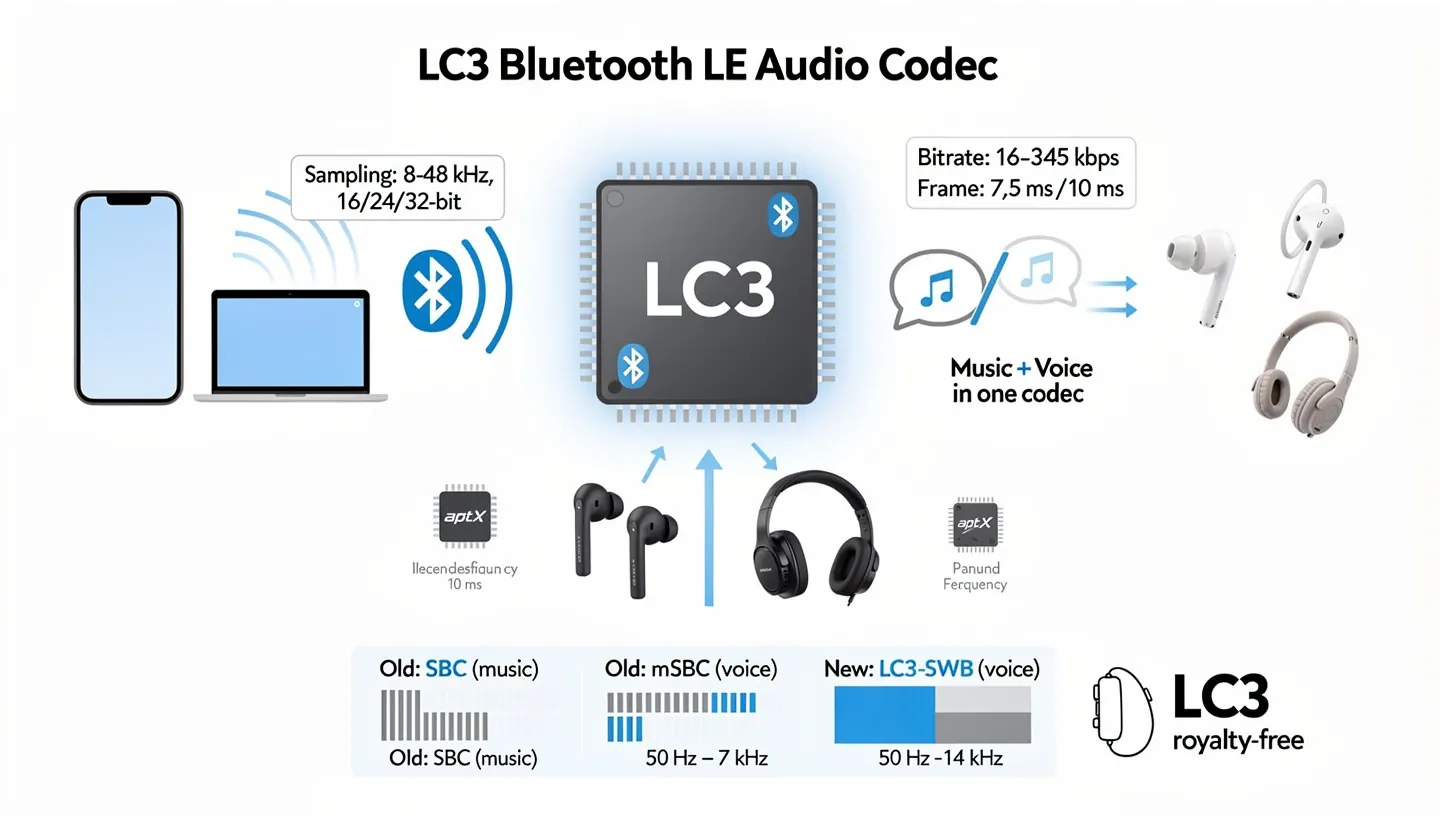
| Newer earbuds with Bluetooth 5.2 or later | LC3 | Variable, often lower than SBC | Better quality at low bit rates, but not everywhere yet |
Every row is genuinely different, and each one is useful on its own. The bit rate figures assume a clean connection at short range; move to another room or stand near a microwave oven and the real-world number drops.
The details experienced listeners get right
Experienced listeners start with the source file. A codec can only preserve what is already there, so a low-bit-rate MP3 sounds flat through even the best Bluetooth codec. They prioritize lossless or high-resolution files to ensure the codec has enough data to work with.
They keep the phone and headphones within about ten metres and with few walls between them. Bluetooth uses radio waves that physical barriers absorb, causing the device to drop the bit rate to maintain the link.
They check the connection partway through a session. If the music sounds watery or cuts out, they move closer or switch to a more robust codec. Cranking the volume only makes compression artifacts more obvious. They leave the source volume moderate and control loudness on the headphones, because sending a maxed signal through a codec adds distortion.
They also ignore the idea that expensive headphones automatically use a better codec. Price doesn’t determine codec support; the chip inside does. A cheap pair with aptX can outperform an expensive pair limited to SBC on the same phone.
When testing a new pair, they verify the active codec in the developer settings of their phone. This confirms the handshake actually occurred as expected. If the gear defaults to a lower-tier option, they manually force the higher-quality codec to ensure the hardware is performing at its full potential.
What to check before you start
No regulator or standards body sets a legal limit on which Bluetooth audio codec a consumer may use, so this section covers what to confirm for your own case instead. Look up your phone’s model and its supported Bluetooth audio codecs on the manufacturer’s support page. Do the same for your headphones.
Check which Bluetooth version each device uses; Bluetooth 5.0 and later handle codec handovers more reliably than older versions. Confirm that your music app isn’t resampling or downmixing the audio before it reaches the Bluetooth stack. If you’re buying headphones for video or gaming, verify low-latency support explicitly, because “aptX” alone doesn’t guarantee it.
If a step needs training, a licence, equipment most people don’t have, or carries a real risk to health, money, or the law, say so in one sentence and point the reader to whoever handles that properly. Changing the codec in Developer options on Android is safe and reversible, but it’s a hidden setting intended for developers, so expect occasional quirks.
Keep the connection steady afterwards
Once you have chosen a codec, keep the phone and headphones paired and charged. Bluetooth performance drops as the battery runs low, and some devices switch to a more basic codec to save power. Store headphones in their case when not in use so the radios stay calibrated and the firmware stays current.
Check for firmware updates every few months through the headphone manufacturer’s app. Updates often improve codec stability and connection range. If the sound starts to cut out after months of use, unpair the headphones and pair them again; this clears stale connection data that can force the pair back to SBC.
Consider the physical environment as well. Dense walls or other active wireless signals can force your device to negotiate a lower bitrate to maintain the stream. If you notice stuttering, move your source closer to the receiver to see if the codec stabilizes at a higher quality.
There’s no universal interval for revisiting your codec choice. Name the sign instead: if music starts to sound flat or video drifts out of sync, revisit the codec settings and the device list.
When this approach is the wrong choice
If you’re editing audio or mixing music, Bluetooth is the wrong choice because every codec adds delay, and you can’t time-align tracks accurately. Use a wired connection instead. Even a few milliseconds of latency will ruin your ability to sync transients or adjust phase, making precise production work impossible.
If you’re listening to lossless or high-resolution files and want every bit preserved, Bluetooth can’t deliver bit-perfect audio because every consumer codec discards some data. Use a wired digital connection or a dedicated high-resolution player. These codecs rely on psychoacoustic modeling to shrink file sizes, which inevitably strips away the microscopic detail audiophiles seek.
If you’re in a very noisy place such as an airplane cabin, a high-bit-rate codec won’t rescue the listening experience. Active noise cancellation and a good seal matter more than the codec in that setting. Ambient roar masks the subtle improvements offered by premium codecs, rendering the extra data effectively invisible to your ears.
Frequently asked questions
Which Bluetooth audio codec should I use?
Use the highest codec that both your phone and your headphones support. For most people that’s AAC on an iPhone and aptX, aptX Adaptive, or LDAC on an Android phone, with SBC as the universal fallback.
Does a higher bit rate always mean better sound?
No. Codec efficiency matters as much as the number, and a strong connection is required to hold a high bit rate without stuttering.
Can I change the codec on an iPhone?
No. Apple devices choose SBC or AAC automatically, and there’s no manual codec setting for the user.
How far can I be from my phone before the codec struggles?
About ten metres with a clear path. Walls, bodies, and other wireless devices shorten that range and lower the effective bit rate.
Is LDAC worth it over aptX?
Only if both your phone and headphones support LDAC and you play high-quality files over a strong connection. Otherwise aptX is the more reliable choice.
What happens if my headphones only support SBC?
Everything still works, but you get the most basic Bluetooth audio quality available, and there’s no setting that can improve it.
Does the codec affect battery life?
Yes, slightly. More complex codecs use a little more power, though the difference is small compared with volume level and noise cancellation.
Conclusion
The best codec is the one both your devices actually agree on, because a high-end codec on only one side silently falls back to the lowest shared option. Check your phone and your headphones, match them, and trust your own ears over the numbers on the box.